Showing posts with label Joomla. Show all posts

Thursday, July 31, 2014

Best Joomla shopping cart tools

Joomla Shopping Cart Extensions

1.Virtuemart

Virtuemart  is most popular shopping cart for joomla .Plugins are available for Paypal, Authorize.net, PayZen, Systempay, Moneybookers, Klarna, Heidelpay. Virtuemart is easily integrated with other Joomla extensions.
Learn & Downlaod

2.HikaShop Shopping Cart

HikaShop is an E-Commerce component for Joomla. Payment plugins are available for PayPal, Google, Authorize.net, MoneyBookers and others. Shipping plugins are also available in Hikashop Shopping cart.


Learn & Downlaod

3.J2Store

J2Store is an E-Commerce plugin for Joomla.It is used to sreate beautiful estore in joomla and may payment,shipping plugins available for J2Store


Learn & Downlaod

4.Joomshopping

Joomshopping is an E-Commerce plugin for Joomla.Main advantages of this plugin is that it is search engine optimized.

Learn & Downlaod

5.redSHOP

RedShop is an E-Commerce component for Joomla. Payment plugins are available for PayPal, Google, Authorize.net, MoneyBookers and others.

Learn & Downlaod

If you feel free post your comments.

Monday, June 23, 2014

Wordpress,Joomla and Drupal Comparsion

Today We will discuss about Most popular CMS tools.If you know about any CMS tools please comment here.

Most popular CMS tools are
  1. Wordpress
  2. Joomla
  3. Drupal


Wordpress:

Wordpress is most popular CMS tool,Is used to create powerful websites and blogs.There are many plugins,themes available in web.

It is open source  tool and we can easily develop websites and blogs.

To develop website in Wordpress Click Here.

Joomla:

Joomla is also Very powerful CMS tool .It is also used to develop web applications and blogs.The latest version of joomla is 3.2.It is have many features like Content Versioning,Rapid framework,Joomla Appstore etc.

Compare to Wordpress, Joomla is little difficult to develop web applications. And Have separate admin section.

To develop website using joomla Click Here

Drupal:

 Drupal is open source CMS tool is used to create web applications.It is diffcult compare to wordpress and Joomla.

Drupal don't have separate admins section.Admin was built in front end.

Wordpress VS Joomla Vs Drupal:

Features Comparison:


Please feel free to comment and don't forget to subscribe my updates via email.

Wednesday, May 28, 2014

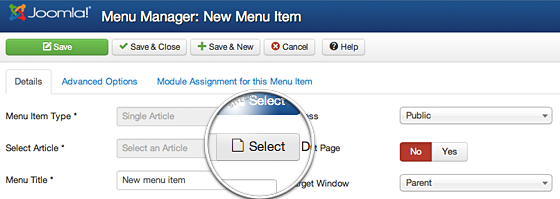
How to link to an Article in a Joomla 3 Menu

Joomla is popular CMS tools.It is used to develop various type of websites.

Adding article is very in Joomla and develop web applications in joomla is very very easy.There is many types of menu types available in joomla.In this i have used Single article menu type to link article.


Find the below steps to add new article.

Step 1: Login to your Joomla admin section using your admin username and password.


Step 2: Add menu name using Menu manager.Enter Menu and alias.


Step 3: Select Menu type.


Step 4:Select Single article from the menu type.


Step 5: Select your article.Click select article button.


Step 6: Finally click Save button.

Tuesday, May 27, 2014

How to write a new Article in Joomla 3

Joomla is CMS(Content Management System),it allows you to magae content very easily.It is very easy to add article in joomla.


Find the below steps to add new article.

Step 1: Login to your Joomla admin section using your admin username and password.
Step 2: There are two options available to add new article.
    1.In the top menu, under Content, hover over Article Manager and then click Add New Article.
2.In the Quick Links click Add New Article.
Step 3:Enter your article title and alias.
Step 4: Select your article category.
Step 5: Enter your content in editor.
Step 6: Finally click Save button to publish your article.
Note:There are many options and settings you can change.This is very basic steps how to add new article.

Please share your comments and feedback.Thanks.Please subscribe my updates via email.


Monday, March 24, 2014

Joomla Database Connection

Database Connection

$db = JFactory::getDBO();

$db is variable of database connection
JFactory::getDBO() - Is the function,which contains the database connection details(host,username,passowrd & database name)