Wednesday, May 28, 2014

Login with Twitter

Twitter is a large social network and they provide Oauth Support.Signin with twitter Oauth is used to avoid form filling for registration and easily signin using twitter account.


This tutorial contains the following files.

1.index.php
2.config.php
3.process.php

and library files provided by twitter.


Config.php

 <?php
        define('CONSUMER_KEY', 'XXXXXXXX'); //Replace With your key
        define('CONSUMER_SECRET', 'XXXXXXXX');//Replace With your CONSUMER SECRET
        define('OAUTH_CALLBACK', 'XXXXXXXX');//Replace With your Callback url
    ?>

Login Button

 <?php
          echo '<a href="process.php"><img src="images/sign-in-with-twitter-l.png" width="151" height="24" border="0" /></a>';
      ?>

Welcome Message for User

<?php
    $Username         =     $_SESSION['request_vars']['screen_name'];//Twitter username
    $twitterid             = $_SESSION['request_vars']['user_id']; //Twitter Account Id
    $oauth_token         = $_SESSION['request_vars']['oauth_token']; //Twiiter Oauth token
    $oauth_token_secret = $_SESSION['request_vars']['oauth_token_secret']; //Twitter Secret
  

    //Show welcome message
    echo '<div class="welcome_txt">Welcome <strong>'.$Username.'</strong> <a href="index.php?reset=1" style="float:right">Logout</a>!</div>';
    $connection = new TwitterOAuth(CONSUMER_KEY, CONSUMER_SECRET, $oauth_token, $oauth_token_secret); ?>

Please share your comments and feebback.Thanks.Please subscribe my updates via email.

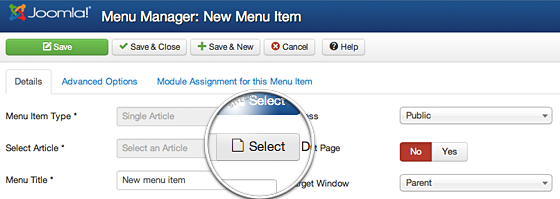
How to link to an Article in a Joomla 3 Menu

Joomla is popular CMS tools.It is used to develop various type of websites.

Adding article is very in Joomla and develop web applications in joomla is very very easy.There is many types of menu types available in joomla.In this i have used Single article menu type to link article.


Find the below steps to add new article.

Step 1: Login to your Joomla admin section using your admin username and password.


Step 2: Add menu name using Menu manager.Enter Menu and alias.


Step 3: Select Menu type.


Step 4:Select Single article from the menu type.


Step 5: Select your article.Click select article button.


Step 6: Finally click Save button.

Directory (or) Folder Creation in PHP

mkdir function is used to create folder or directory in php.

Syntax:
mkdir($str, 0777, true)

PHP Code

<?php
        if(isset($_POST['createdirectory']))
        {
                $folder='D:\phptest\\'; // Desired folder path
                $foldername=$_POST['foldername'];
                $foldercreate=$folder . $foldername;
            if (!mkdir($foldercreate, 0777, true))
                {
                    die('Failed to create folder...');
                }
            else
                {
                    echo "Folder has been created successfully!";
                }
                    $foldercreate="";
                }
        ?>

HTML Form

 <form action="#" method="post">
      Enter Name of the folder:
      <input type="text" name="foldername" size="15" required />
      <input type="submit" name="createdirectory" value="Create" />
  </form>

Complete Code

 <form action="#" method="post">
  <h3>Directory (or) Folder Creation in PHP:</h3>
  Enter Name of the folder:
  <input type="text" name="foldername" size="15" required />
  <input type="submit" name="createdirectory" value="Create" />
  <?php
if(isset($_POST['createdirectory']))
{
        $folder='D:\phptest\\'; // Desired folder path
        $foldername=$_POST['foldername'];
        $foldercreate=$folder . $foldername;
     if (!mkdir($foldercreate, 0777, true))
        {
            die('Failed to create folder...');
        }
    else
        {
            echo "Folder has been created successfully!";
        }
            $foldercreate="";
        }
?>
  </div>
</form>

Please share your comments and feebback.Thanks.Please subscribe my updates via email.

Tuesday, May 27, 2014

How to write a new Article in Joomla 3

Joomla is CMS(Content Management System),it allows you to magae content very easily.It is very easy to add article in joomla.


Find the below steps to add new article.

Step 1: Login to your Joomla admin section using your admin username and password.
Step 2: There are two options available to add new article.
    1.In the top menu, under Content, hover over Article Manager and then click Add New Article.
2.In the Quick Links click Add New Article.
Step 3:Enter your article title and alias.
Step 4: Select your article category.
Step 5: Enter your content in editor.
Step 6: Finally click Save button to publish your article.
Note:There are many options and settings you can change.This is very basic steps how to add new article.

Please share your comments and feedback.Thanks.Please subscribe my updates via email.


Monday, May 26, 2014

Caps Lock Alert jQuery plugin

The CapsLockAlert() function is used to detect caps lock.


CapsLock detector is very useful function.Before that We need jQuery library file to perform this action.So include the following library files.
1.jquery.min.js
2.jquery.tipsy.js


There is a plugin called jquery.jccapsalert.js ,used to detect state of capslock.

JQuery Library Files

<script type="text/javascript" src="https://ajax.googleapis.com/ajax/libs/jquery/1.7.2/jquery.min.js"></script>
    <script type="text/javascript" src="js/jquery.tipsy.js"></script>
    <script type="text/javascript" src="js/jquery.jccapsalert.js"></script>

JQuery Functions

<script type="text/javascript">
            jQuery("#pass").CapsLockAlert();
      </script>

The CapsLockAlert() function is used to detect caps lock.

HTML Form

<form>
      Enter Your Password
      <input type="password" id="pass" value=""/>
    </form>
Please share your comments and feebback.Thanks.Please subscribe my updates via email.

Saturday, May 24, 2014

Generate captcha using Javascript

Hi friends.In this post i am going to show how to create captcha using Javascript.

The captacha code is creating using onload() function.And i have used two math function to create captcha.

1.Math.ceil
    The ceil() method rounds a number UPWARDS to the nearest integer, and returns the result.

2.Math.random
    The random() method returns a random numbers.

Javascript Functions

<script type="text/javascript">

   //Created / Generates the captcha function  
    function DrawCaptcha()
    {
        var a = Math.ceil(Math.random() * 9)+ '';
        var b = Math.ceil(Math.random() * 9)+ '';     
        var c = Math.ceil(Math.random() * 9)+ '';
        var d = Math.ceil(Math.random() * 9)+ '';
        var e = Math.ceil(Math.random() * 9)+ '';
        var f = Math.ceil(Math.random() * 9)+ '';
        var g = Math.ceil(Math.random() * 9)+ '';
        var code = a + ' ' + b + ' ' + ' ' + c + ' ' + d + ' ' + e + ' '+ f + ' ' + g;
           document.getElementById("txtCaptcha").value = code;
        document.getElementById("txtCaptchaDiv").innerHTML = code;
    }

    // Remove the spaces from the entered and generated code
    function removeSpaces(string)
    {
        return string.split(' ').join('');
    }
  

</script>

HTML Form

  <form method="post" action="#" id="form1" name="form1">
      <table cellspacing="0" cellpadding="2" border="0">
        <tbody>
          <tr >
            <td class="style1">Enter This Code <span style="color:#F30">*</span></td>
            <td colspan="2" style="margin-top: 10px;display: block;margin-bottom: 10px;"><span id="txtCaptchaDiv"></span></td>
          </tr>
          <tr>
            <td>&nbsp;</td>
            <td colspan="2"><input type="hidden" id="txtCaptcha" />
            </td>
          </tr>
        </tbody>
      </table>
    </form>
Please share your comments and feebback.Thanks.Please subscribe my updates via email.

Generate Password Using Jquery

Hi friends.In this post i am going to show how to Generate Password Using Jquery using Passy Jquery Plugin.

Passy is a jQuery plugin.It is used to rate the password and generate new passwords.

Features:

1.Check password strength.
2.Checks lowercase, uppercase, numbers, punctiation and foreign characters.
3.Compare passwords with pattern like '!#$*+-.:?@^'.
4.Generate new passwords.

JQuery Functions

<script type="text/javascript">
    var $input = $('#input');
    var $output = $('#output');
    $('#pwd').click(function() {
        $input.passy('generate', 8);
    });
</script>

HTML Form

<form method="post" action="#">
          Enter your password :
          <input type="text" id="input" />
          <a href="javascript:void(0);" id="pwd">generate</a>
        </form>

Please share your comments and feebback.Thanks.Please subscribe my updates via email.